Micro Frontends with Module Federation
⚡ What changed since the original
This article was first written for Angular 11 (2020). The micro-frontend concept — a shell composing independently built and deployed remote apps — is unchanged in v22. What changed is the entire underlying technology stack:
- The builder changed. Angular CLI moved from webpack to esbuild's Application Builder as the default for new projects (Angular 17+). The webpack-based
@angular-builders/custom-webpackapproach used in the original no longer works with the Application Builder. - Module Federation changed. Webpack 5 Module Federation is tied to webpack's runtime, so it can't run on the esbuild builder. The community answer is Native Federation by Manfred Steyer / ANGULARarchitects — same mental model, but built on browser-native standards (ES modules + Import Maps) instead of webpack internals. Starting Angular 22, the package is
@angular-architects/native-federation-v4(the "v4 upgrade"). remoteEntry.jsis nowremoteEntry.json— a static manifest, not executable webpack-runtime code.webpack.config.jsis nowfederation.config.js(or.mjs), declared withwithNativeFederation()andshareAll()helpers.- Routes load components, not NgModules.
loadChildrenreturning an NgModule is replaced byloadComponentreturning a standalone component (orloadChildrenreturning standaloneRoutes). bootstrapApplication()replacesbootstrapModule(), and providers move from@NgModuletobootstrapApplication'sprovidersarray.- The async bootstrap split survives — but for a different reason. In webpack MF it dodged the "eager consumption" error; in Native Federation it gives
initFederation()time to install the import map before any framework imports execute. The mechanism reflection at the end walks through both.
Every webpack-era code block below is preserved with its <!-- legacy --> marker and followed by a v22 Native Federation equivalent so you can see what migration actually looks like step by step. If you've been there with webpack MF, the deep mechanism contrast at the end is where the "why" lives.
See also: Standalone Migration · SSR & Hydration · Router (modern)
Good frontend development is hard. Scaling frontend development so that many teams can work simultaneously on a large and complex product is even harder.
What are micro frontends?
Single Page Apps (SPAs) are everywhere — feature-rich, complex, and often paired with microservices on the backend. Over time they grow into frontend monoliths that are hard to maintain.
Recently, microservices ideas have been applied to the frontend. Micro frontends split one SPA into independently developed feature slices, each owned by its own team.
"An architectural style where independently deliverable frontend applications are composed into a greater whole"
Monolithic frontends
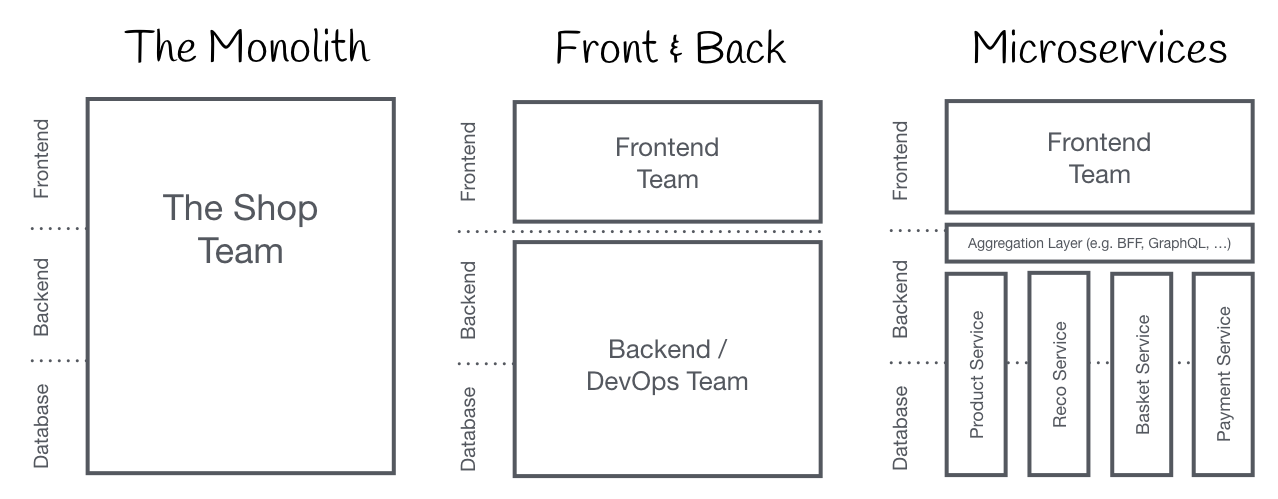
source: https://micro-frontends.org
Micro frontends
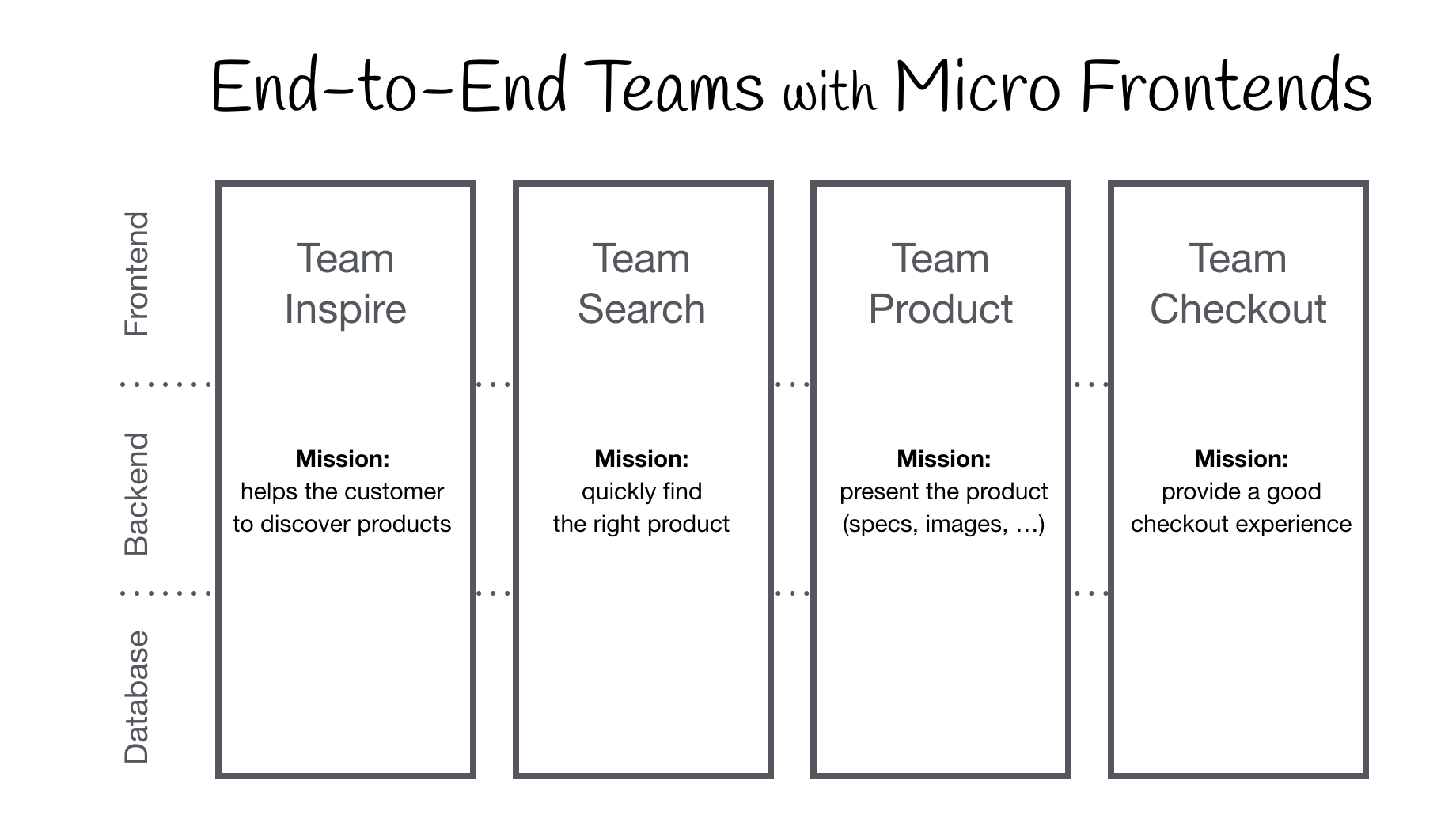
source: https://micro-frontends.org
Approaches
The landscape in 2026 looks like this:
- Iframe — easy but limited (navigation, running host scripts, etc.)
- Proxy (e.g. nginx) — separate apps at paths like
<host>/mailbox,<host>/calendar; navigating between apps feels like a full reload - Web Components — framework-agnostic custom elements (Angular Elements, Stencil)
- Webpack 5 Module Federation — the original orchestration solution; deprecated for new Angular projects because the Angular CLI's Application Builder is now esbuild-based, not webpack-based. Still works if you stay on the older
browserbuilder. - Native Federation — the v22 successor. Same mental model as Module Federation, but bundler-agnostic and built on Import Maps + ESM. This is what we'll use below.
- Orchestrator frameworks — piral, luigi, single-spa
Build an email client with micro frontends
Demo repo (original webpack version): https://github.com/tieppt/micro-frontends-demo

Two teams can own mailbox and calendar. The calendar team might ship a widget embeddable in mailbox pages via custom elements.
Shell or host app
Micro apps need a shell (host) for routing, shared state, and composition. The shell technology constrains micro apps — e.g. Angular/React shells need wrappers so each micro app's router obeys the host framework.
Prerequisites
Path A — original webpack walkthrough (Angular 14). Webpack 5 Module Federation via @angular-builders/custom-webpack. Works if you stay on the legacy browser builder. New Angular 17+ projects use the Application Builder by default, so this path is essentially frozen at older Angular versions.
Path B — v22 walkthrough (Native Federation v4). Uses Angular's esbuild-based Application Builder and Native Federation v4. Same mental model — shell, remotes, exposes, shared — but bundler-agnostic and built on browser standards.
Path A: webpack workspace setup (legacy reference)
npx @angular/cli@14 new ngft-email-client --create-application=falseGenerate three applications — shell plus two remotes:
npx ng generate application shell
# ? Would you like to add Angular routing? Yes
# ? Which stylesheet format would you like to use? SCSS

npx ng generate application mailbox
# routing: Yes, SCSS

npx ng generate application calendar
# routing: Yes, SCSSInstall custom webpack support:
npm i -D @angular-builders/custom-webpack@14Path B: v22 workspace setup with Native Federation
# ── v22 equivalent: Application Builder + Native Federation v4 ────────────
npx @angular/cli@22 new ngft-email-client --create-application=false
cd ngft-email-client

# Generate apps as standalone (the v22 default — no --standalone flag needed)
ng generate application shell --routing --style=scss
ng generate application mailbox --routing --style=scss
ng generate application calendar --routing --style=scss

# Install Native Federation v4 (the package name changed for v22)
npm i -D @angular-architects/native-federation-v4

# Initialize each app — the schematic edits angular.json, generates
# federation.config.js, and wires up main.ts for you.
ng add @angular-architects/native-federation-v4 \
  --project shell --type dynamic-host --port 5200

ng add @angular-architects/native-federation-v4 \
  --project mailbox --type remote --port 5300

ng add @angular-architects/native-federation-v4 \
--project calendar --type remote --port 5400Note --type dynamic-host on the shell — this is the v22 recommendation. A dynamic host reads its remote URLs from federation.manifest.json at runtime, so you can ship one host build to multiple environments and change which remotes load by swapping the manifest. A static host bakes the URLs into the build.
Path A: webpack package.json (legacy reference)
{
  "name": "acme-email-client",
  "scripts": {
    "start:shell": "ng serve --project=shell",
    "start:mailbox": "ng serve --project=mailbox",
    "start:calendar": "ng serve --project=calendar"
  },
  "dependencies": {
    "@angular/animations": "^14.2.0",
    "@angular/common": "^14.2.0",
    "@angular/compiler": "^14.2.0",
    "@angular/core": "^14.2.0",
    "@angular/forms": "^14.2.0",
    "@angular/platform-browser": "^14.2.0",
    "@angular/platform-browser-dynamic": "^14.2.0",
    "@angular/router": "^14.2.0",
    "rxjs": "~7.5.0",
    "tslib": "^2.3.0",
    "zone.js": "~0.11.4"
  },
  "devDependencies": {
    "@angular-builders/custom-webpack": "^14.0.1",
    "@angular-devkit/build-angular": "^14.2.3",
    "@angular/cli": "~14.2.3",
    "@angular/compiler-cli": "^14.2.0",
    "typescript": "~4.7.2"
  }
}Path B: v22 package.json
{
  "name": "acme-email-client",
  "scripts": {
    "start:shell": "ng serve --project=shell",
    "start:mailbox": "ng serve --project=mailbox",
    "start:calendar": "ng serve --project=calendar"
  },
  "dependencies": {
    "@angular/animations": "^22.0.0",
    "@angular/common": "^22.0.0",
    "@angular/compiler": "^22.0.0",
    "@angular/core": "^22.0.0",
    "@angular/forms": "^22.0.0",
    "@angular/platform-browser": "^22.0.0",
    "@angular/router": "^22.0.0",
    "rxjs": "~7.8.0",
    "tslib": "^2.6.0"
    // zone.js intentionally omitted — v22 supports zoneless change detection.
    // If you keep Zone.js for now, add it back.
    // @angular/platform-browser-dynamic is no longer the bootstrap entry point —
    // bootstrapApplication() from @angular/platform-browser is used instead.
  },
  "devDependencies": {
    "@angular-architects/native-federation-v4": "^22.0.0",
    "@angular-devkit/build-angular": "^22.0.0",
    "@angular/cli": "^22.0.0",
    "@angular/compiler-cli": "^22.0.0",
    "typescript": "~5.5.0"
  }
}Notice what's gone: @angular-builders/custom-webpack (no more webpack config injection), @angular/platform-browser-dynamic (replaced by bootstrapApplication from @angular/platform-browser), and zone.js (optional in v22 — only included if you opt out of zoneless).
Enable Module Federation
Assign ports — under Path A you edit angular.json directly:
Path A: webpack builder config (legacy reference)
{
  "projects": {
    "shell": {
      "architect": {
        "build": {
          "builder": "@angular-builders/custom-webpack:browser",
          "options": {
            "customWebpackConfig": {
              "path": "projects/shell/webpack.config.js"
            }
          },
          "configurations": {
            "production": {
              "customWebpackConfig": {
                "path": "projects/shell/webpack.prod.config.js"
              }
            }
          }
        },
        "serve": {
          "builder": "@angular-builders/custom-webpack:dev-server",
          "options": {
            "port": 5200,
            "publicHost": "http://localhost:5200/"
          }
        }
      }
    }
  }
}Repeat for mailbox and calendar.
Path B: v22 native-federation builder config
The ng add schematic generates this for you. The key shift: there's no custom webpack config, because the Application Builder is esbuild and there's no webpack to extend. Instead, Native Federation provides its own builder that wraps the Application Builder:
{
  "projects": {
    "shell": {
      "architect": {
        "build": {
          "builder": "@angular-architects/native-federation-v4:build",
          "options": {},
          "configurations": {
            "production": { "target": "shell:esbuild:production" },
            "development": { "target": "shell:esbuild:development", "dev": true }
          },
          "defaultConfiguration": "production"
        },
        "esbuild": {
          "builder": "@angular-devkit/build-angular:application",
          "options": {
            "outputPath": "dist/shell",
            "index": "projects/shell/src/index.html",
            "browser": "projects/shell/src/main.ts",
            "tsConfig": "projects/shell/tsconfig.app.json",
            "polyfills": []
          }
        },
        "serve": {
          "builder": "@angular-architects/native-federation-v4:build",
          "options": {
            "target": "shell:serve-original:development",
            "port": 5200,
            "dev": true
          }
        },
        "serve-original": {
          "builder": "@angular-devkit/build-angular:dev-server",
          "options": { "buildTarget": "shell:esbuild:development" }
        }
      }
    }
  }
}A couple of things worth noticing:
- The Native Federation builder is a thin wrapper around the Application Builder (
@angular-devkit/build-angular:application). It delegates to esbuild for the actual compile and just layers federation concerns on top — generatingremoteEntry.json, building shared deps as standalone ESM chunks, etc. - The
serve-originaltarget exists so the federation builder can re-invoke the standard Angular dev server. You don't usually touch it. - The
polyfillsarray is empty —zone.jsis no longer added by default in v22 (you opt in if you want Zone-based change detection).
Path A: webpack shell config (legacy reference)
// projects/shell/webpack.config.js
const { ModuleFederationPlugin } = require('webpack').container;

/** @type {require('webpack').Configuration} */
module.exports = {
  output: {
    publicPath: 'auto',
    uniqueName: 'shell',
  },
  optimization: {
    runtimeChunk: false,
  },
  experiments: {
    outputModule: true,
  },
  plugins: [
    new ModuleFederationPlugin({
      name: 'shell',
      library: {
        type: 'module',
      },
      remotes: {
        mailbox: 'http://localhost:5300/remoteEntry.js',
        calendar: 'http://localhost:5400/remoteEntry.js',
      },
      shared: ['@angular/core', '@angular/common', '@angular/router'],
    }),
  ],
};Path B: v22 federation.config.js for the shell
// projects/shell/federation.config.js
// Generated by the ng add schematic. Note: ESM-flavored in v4 — use .mjs or
// "type": "module" in package.json if you want top-level imports rather than
// require().
const { withNativeFederation, shareAll } = require('@angular-architects/native-federation-v4/config');

module.exports = withNativeFederation({
  // A dynamic host loads remote URLs from federation.manifest.json at runtime,
  // so the `remotes` block is empty here. With a static host you'd list them.
  shared: {
    ...shareAll({
      singleton: true,
      strictVersion: true,
      requiredVersion: 'auto',
    }),
  },
  // skip lists packages that should NOT be shared via federation —
  // typically dev-only or environment-coupled packages.
  skip: [
    'rxjs/ajax',
    'rxjs/fetch',
    'rxjs/testing',
    'rxjs/webSocket',
  ],
});shareAll is the v22 ergonomic improvement over hand-listing @angular/core, @angular/common, @angular/router etc. — it inspects package.json and shares every runtime dependency. The skip array opts out of specific entries. singleton: true + strictVersion: true is the standard combo: same package version across all federated apps, exactly one instance loaded.
Path A: shell routing with loadChildren + NgModule (legacy reference)
// projects/shell/src/app/app-routing.module.ts
const routes: Routes = [
  {
    path: 'mailbox',
    loadChildren: () => import('mailbox/MailboxModule').then(m => m.MailboxModule)
  },
  {
    path: 'calendar',
    loadChildren: () => import('calendar/CalendarModule').then(m => m.CalendarModule)
  }
];TypeScript doesn't know those virtual paths — add src/types.d.ts:
declare module 'mailbox/MailboxModule';
declare module 'calendar/CalendarModule';Path B: v22 shell routing with loadRemoteModule + standalone
// projects/shell/src/app/app.routes.ts
import { Routes } from '@angular/router';
import { loadRemoteModule } from '@angular-architects/native-federation-v4';

export const routes: Routes = [
  {
    path: 'mailbox',
    // Logical name 'mailbox' is resolved via federation.manifest.json,
    // not a hardcoded URL. The manifest can differ per environment.
    loadComponent: () =>
      loadRemoteModule('mailbox', './Component').then(m => m.MailboxComponent),
  },
  {
    path: 'calendar',
    loadComponent: () =>
      loadRemoteModule('calendar', './Component').then(m => m.CalendarComponent),
  },
  // Or, if the remote exposes a routes array:
  // {
  //   path: 'mailbox',
  //   loadChildren: () =>
  //     loadRemoteModule('mailbox', './Routes').then(m => m.MAILBOX_ROUTES),
  // },
];You no longer need the types.d.ts virtual-module declarations — loadRemoteModule takes plain strings, so TypeScript has nothing to complain about.
And the manifest the host reads at startup:
// projects/shell/public/federation.manifest.json
// (or src/assets/ — the schematic picks based on your asset config)
{
  "mailbox": "http://localhost:5300/remoteEntry.json",
  "calendar": "http://localhost:5400/remoteEntry.json"
}Two things to absorb here:
- The keys (
mailbox,calendar) are logical names, and they're what you pass toloadRemoteModule(). The actual URL lives only in the manifest. To point at staging vs production, you ship a different manifest — no rebuild. - The remote entry is
.json, not.js. It's a static descriptor of what the remote exposes and which packages it would like to share. The shell parses it at startup and weaves it into a unified import map. We'll see how this works mechanically at the end.
The bootstrap split — still here, different reason
Run yarn start:shell on Path A and you may hit this:
Uncaught Error: Shared module is not available for eager consumption
This is the famous webpack MF "eager consumption" error. The webpack docs recommend splitting bootstrap behind a dynamic import:
Path A: webpack bootstrap split (legacy reference)
// projects/shell/src/main.ts
import('./bootstrap').catch(err => console.error(err));// projects/shell/src/bootstrap.ts
import { enableProdMode } from '@angular/core';
import { platformBrowserDynamic } from '@angular/platform-browser-dynamic';
import { AppModule } from './app/app.module';
import { environment } from './environments/environment';
if (environment.production) {
enableProdMode();
}
platformBrowserDynamic().bootstrapModule(AppModule)
.catch(err => console.error(err));Path B: v22 bootstrap with initFederation
The bootstrap split survives — but now it gates on initFederation() finishing, not on a webpack share-scope race. initFederation() is async because it has to fetch the manifest, fetch each remote's remoteEntry.json, compute a unified import map, and install it via <script type="importmap"> before any framework import can resolve.
// projects/shell/src/main.ts
import { initFederation } from '@angular-architects/native-federation-v4';

initFederation('/federation.manifest.json')
  .catch(err => console.error(err))
  .then(_ => import('./bootstrap'))
.catch(err => console.error(err));// projects/shell/src/bootstrap.ts
import { bootstrapApplication } from '@angular/platform-browser';
import { provideRouter } from '@angular/router';
import { provideHttpClient, withFetch } from '@angular/common/http';
import { AppComponent } from './app/app.component';
import { routes } from './app/app.routes';
bootstrapApplication(AppComponent, {
providers: [
provideRouter(routes),
provideHttpClient(),
// Note: withFetch() was deprecated in v22 — Fetch is now the default
// HttpClient backend. Listed here as a reminder, not a recommendation.
],
}).catch(err => console.error(err));What changed at the framework level:
platformBrowserDynamic().bootstrapModule(AppModule)→bootstrapApplication(AppComponent, { providers: [...] })RouterModule.forRoot(routes)(insideAppModule) →provideRouter(routes)in the providers arrayenableProdMode()is now automatic in production builds; you don't call it explicitlyHttpClientModule→provideHttpClient()
We'll dig into why both paths need a bootstrap split in the mechanism reflection.
Remote app config (mailbox example)
Path A: webpack remote config (legacy reference)
// projects/mailbox/webpack.config.js
const { ModuleFederationPlugin } = require('webpack').container;

module.exports = {
  output: {
    publicPath: 'auto',
    uniqueName: 'mailbox',
  },
  optimization: {
    runtimeChunk: false,
  },
  experiments: {
    outputModule: true,
  },
  plugins: [
    new ModuleFederationPlugin({
      name: 'mailbox',
      filename: 'remoteEntry.js',
      library: {
        type: 'module',
      },
      exposes: {
        './MailboxModule': 'projects/mailbox/src/app/mailbox/mailbox.module.ts',
      },
      shared: ['@angular/core', '@angular/common', '@angular/router'],
    }),
  ],
};Path B: v22 federation.config.js for the mailbox remote
// projects/mailbox/federation.config.js
const { withNativeFederation, shareAll } = require('@angular-architects/native-federation-v4/config');

module.exports = withNativeFederation({
  name: 'mailbox',

  exposes: {
    // Expose a standalone component (most common in v22)
    './Component': './projects/mailbox/src/app/mailbox/mailbox.component.ts',
    // Or expose a routes array for remotes that own a route subtree
    './Routes': './projects/mailbox/src/app/mailbox/mailbox.routes.ts',
  },

  shared: {
    ...shareAll({
      singleton: true,
      strictVersion: true,
      requiredVersion: 'auto',
    }),
  },

  skip: ['rxjs/ajax', 'rxjs/fetch', 'rxjs/testing', 'rxjs/webSocket'],
});Path A: NgModule-based remote (legacy reference)
// projects/mailbox/src/app/mailbox/mailbox.module.ts
export const MAILBOX_ROUTES: Routes = [
  {
    path: '',
    component: MailboxHomeComponent,
  }
];

@NgModule({
  declarations: [
    MailboxHomeComponent
  ],
  imports: [
    CommonModule,
    RouterModule.forChild(MAILBOX_ROUTES),
  ]
})
export class MailboxModule { }Path B: v22 standalone remote
// projects/mailbox/src/app/mailbox/mailbox.component.ts
import { Component } from '@angular/core';
import { RouterOutlet } from '@angular/router';

@Component({
  selector: 'app-mailbox',
  // standalone: true is the v22 default — no need to write it
  imports: [RouterOutlet],
  template: `
    <h2>Mailbox</h2>
    <router-outlet />
  `,
})
export class MailboxComponent {}// projects/mailbox/src/app/mailbox/mailbox.routes.ts
import { Routes } from '@angular/router';
import { MailboxComponent } from './mailbox.component';
import { MailboxHomeComponent } from './mailbox-home.component';
export const MAILBOX_ROUTES: Routes = [
{
path: '',
component: MailboxComponent,
children: [
{ path: '', component: MailboxHomeComponent },
],
},
];The remote's own main.ts follows the same initFederation + bootstrap split as the shell, so the remote can also run standalone (i.e., navigate directly to http://localhost:5300 and see Mailbox running without a shell):
// projects/mailbox/src/main.ts
import { initFederation } from '@angular-architects/native-federation-v4';

initFederation()
  .catch(err => console.error(err))
  .then(_ => import('./bootstrap'))
.catch(err => console.error(err));// projects/mailbox/src/bootstrap.ts
import { bootstrapApplication } from '@angular/platform-browser';
import { provideRouter } from '@angular/router';
import { MailboxComponent } from './app/mailbox/mailbox.component';
import { MAILBOX_ROUTES } from './app/mailbox/mailbox.routes';
bootstrapApplication(MailboxComponent, {
providers: [provideRouter(MAILBOX_ROUTES)],
}).catch(err => console.error(err));The calendar remote mirrors mailbox with its own component and routes file.
Run the apps
Both paths use the same commands:
npm run start:shell
npm run start:mailbox
npm run start:calendarOpen:
- http://localhost:5200/ — the shell
- http://localhost:5300/ — mailbox running standalone
- http://localhost:5400/ — calendar running standalone

Each micro app runs standalone or through the shell. The "runs standalone" property is one of the headline benefits of federation — each team can develop and deploy in isolation.
Mechanism reflection — webpack Module Federation vs Native Federation
The conceptual model is identical between the two: a shell loads remote micro frontends at runtime, both sides declare which packages they want to share so they get loaded once and deduplicated. What differs is the runtime substrate — and the difference is dramatic enough to be worth dissecting.
The shared mental model — what both technologies provide
Both Module Federation and Native Federation give you these primitives:
- A shell (host) that doesn't know its remotes at build time
- Remotes that expose a public surface (components, routes, services)
- A
shareddeclaration so each side gets the same instance of common deps (@angular/core,rxjs, etc.) rather than loading them N times - Lazy loading at the route level — remotes are only fetched when their route activates
- Independent deployability — you can ship a new mailbox version without rebuilding the shell
If you understood the what of webpack MF, you understand the what of Native Federation. The whole upgrade is about the how.
How webpack 5 Module Federation works under the hood
In Path A, every federated app embeds a copy of webpack's runtime — a chunk of JavaScript inserted into every bundle that implements __webpack_require__, chunk-loading, and the share scope object. The share scope is a global registry (think window.__webpack_share_scopes__.default) that maps "@angular/core" to all known versions of @angular/core that have registered.
The lifecycle of a federated app in webpack MF looks like this:
-
Build time.
ModuleFederationPlugingenerates a special chunk calledremoteEntry.js. This is not a manifest — it's an executable IIFE that exposes a webpack container with aget(moduleName)function and aninit(shareScope)function. -
App startup. The shell's bundle includes the webpack runtime. On script load, the runtime registers all of the shell's own shared packages into the share scope.
-
Route activation. When the user hits
/mailbox, the shell's router triggersimport('mailbox/MailboxModule'). Webpack rewrites this at build time into:- "fetch
http://localhost:5300/remoteEntry.jsvia a dynamic<script>tag" (a JSONP-style load) - "call
mailbox.init(shareScope)to let the remote register its shared packages" - "call
mailbox.get('./MailboxModule')to get the actual module factory" - "execute the factory and hand the result to the router"
- "fetch
-
Dedup happens via the share scope. When the remote's
MailboxModuleimports@angular/core, webpack's runtime intercepts the import, looks at the share scope, finds the version the shell already registered, and uses that copy — not a fresh one bundled with the remote.
This is mechanically clever, but it has a sharp edge: the eager consumption error. The shell's main.ts synchronously imports AppModule, which transitively imports @angular/core. That synchronous import happens during the same JavaScript task as the webpack runtime's share-scope registration. If your code asks for a shared module before its provider has registered, you get:
Uncaught Error: Shared module is not available for eager consumption
The recommended fix is the bootstrap split: main.ts does only import('./bootstrap'). Dynamic imports cross chunk boundaries, so webpack guarantees the share scope is fully populated before bootstrap.ts runs. The bootstrap split isn't an Angular thing — it's pure webpack runtime ordering. Every other framework using webpack MF deals with the same dance.
The deeper architectural property to notice: webpack ships its own JavaScript runtime that re-implements module loading. The browser's native ES module loader is bypassed entirely. The share scope, the chunk graph, JSONP-style script injection, eager consumption — these are all consequences of running a userland runtime on top of script tags. It works, but it's heavy and it's webpack-only.
Why webpack MF didn't survive into modern Angular
Three things conspired:
-
The Angular CLI moved to esbuild. Starting Angular 17, the new Application Builder (
@angular-devkit/build-angular:application) uses esbuild for compilation and Vite for the dev server. The old browser builder (which used webpack) is in maintenance mode. There is noModuleFederationPluginfor esbuild — and there can't be one in any reasonable sense, because the plugin is deeply coupled to webpack's runtime model. -
Webpack MF doesn't play well with SSR. Angular added Server-Side Rendering with non-destructive hydration in v17, and incremental hydration in v19+. The webpack MF runtime makes assumptions (browser globals,
<script>injection, JSONP) that fight Node ESM. Bridging the two is doable but painful. -
Bundle bloat. Every federated app ships the webpack runtime plus a copy of the share scope machinery. For small remotes this is a meaningful percentage of the total bundle.
So a successor was needed: same mental model, different substrate, ideally something the browser already implements natively so we don't have to ship a runtime at all.
How Native Federation works under the hood
The successor — Native Federation, originally by Manfred Steyer at ANGULARarchitects — leans on two browser-native standards:
- ES modules (
import()is just a browser built-in) - Import Maps — a
<script type="importmap">JSON document that tells the browser's module loader how to resolve bare specifiers like"@angular/core"to actual URLs
The lifecycle of a federated app in Native Federation looks like this:
-
Build time. The Native Federation builder runs on top of esbuild's Application Builder. For each app it generates:
- The app's own ESM chunks (just normal esbuild output)
- A
remoteEntry.json— a static manifest describing what's exposed and which packages this remote wants to share, along with their versions and the URLs of their pre-built ESM chunks - Pre-built ESM bundles for each shared package (e.g.,
@angular/core.mjs,rxjs.mjs), cached innode_modules/.cacheso subsequent builds reuse them
-
App startup.
main.tscallsinitFederation('/federation.manifest.json'). This:- Fetches
federation.manifest.jsonto discover remote URLs - For each remote, fetches its
remoteEntry.json - Negotiates shared package versions across all participants (picks one version per package, respecting
singleton: true) - Builds a unified import map mapping
"@angular/core"→https://shell-origin/.../angular-core.mjs(only one URL, no duplication) - Injects that import map into the page via
<script type="importmap">
- Fetches
-
Bootstrap runs. Only after
initFederation()resolves doesimport('./bootstrap')fire.bootstrap.tsdoesbootstrapApplication(AppComponent), which transitively imports@angular/core— and now the browser's native ES module loader resolves that bare specifier through the import map, fetching the single agreed-upon copy. -
Route activation. When the user hits
/mailbox, the route callsloadRemoteModule('mailbox', './Component'). Native Federation translates this into a plainimport('https://localhost:5300/.../mailbox-component.mjs'). The browser's loader fetches it and executes it. Inside the mailbox component,import { Component } from '@angular/core'resolves through the same import map — same singleton.
Why the bootstrap split is still needed (different reason)
In webpack MF, the bootstrap split exists to let the share scope register before any sync code consumes shared modules.
In Native Federation, the bootstrap split exists because import maps become immutable the moment the first <script type="module"> tag executes or the first import() call is made. So:
main.tsmust not statically import@angular/coreor anything else that would resolve through the mapmain.tsis allowed to doimport { initFederation } from '@angular-architects/native-federation-v4'because that package is bundled withmain.ts, not resolved through the import mapinitFederation()runs, fetches everything async, and injects the import map- Only then does
import('./bootstrap')execute, and the framework imports insidebootstrap.tsresolve correctly
The shape of the code is identical to the webpack version. The mechanism behind it is different. (Side note: native ESM has an HTML spec called Module Workers and an upcoming proposal — "ESM Phase Imports" / "Multiple Import Maps" — that may eventually let you mutate import maps after startup, removing even this restriction. For now, the bootstrap split stays.)
Singleton semantics — how each one dedupes
Both technologies promise "load @angular/core exactly once". They achieve it differently:
-
Webpack MF uses the share scope: when a remote imports
@angular/core, webpack's runtime checks the share scope for a registered version that satisfiesrequiredVersion. If found, it returns that registered module. Identity is preserved because webpack short-circuits the import to the same factory result. -
Native Federation uses import-map identity: the import map has exactly one entry for
"@angular/core", pointing at one URL. Both the shell and the remote, when theyimport { Component } from '@angular/core', resolve to that one URL. The browser's module loader keeps one module record per URL — that's the ES spec — so both sides see the same singleton automatically. No runtime tricks needed. The dedup is a consequence of ES module semantics.
The Native Federation version is structurally simpler because the dedup falls out of standards rather than runtime machinery.
What you gain with Native Federation
- No webpack required. Works on esbuild, Vite, Rollup, or any builder that emits ESM. The Angular adapter happens to use esbuild because that's the CLI's choice.
- Smaller per-app overhead. No webpack runtime in every bundle.
- Cross-framework remotes. Because the runtime contract is just "browser ESM + import maps", a React or Vue remote can be loaded into an Angular shell without a shim layer. The shared deps need version compatibility, but the runtime story is uniform.
- SSR and incremental hydration support — Native Federation works in Node ESM environments because it uses standard ES modules end to end.
- DevTools work natively. No webpack-mangled module IDs. The Sources panel shows real file paths.
remoteEntry.jsonis inspectable. Open the URL, read the JSON. Compare that to inspecting a webpack-IIFE remote entry, which requires squinting at minified runtime code.
What you lose (or have to think about)
- Browser baseline. Native import-map support landed in Chrome 89 / Edge 89 / Firefox 108 / Safari 16.4. For older targets you ship the
es-module-shimspolyfill, which Native Federation can configure for you. - Some advanced webpack MF features — particularly automatic async-boundary insertion and the original eager-consumption-as-warning pattern — don't have direct equivalents. In practice the new model is simpler, so you don't usually miss them.
- Migration cost if you have an existing webpack MF setup. The mental model carries over but every config file is different, and the runtime invocation (
loadRemoteModulesignature, manifest file, init code) is different. There's an official migration guide that handles the mechanical parts.
The TL;DR for anyone moving from webpack MF
If you've been there with webpack MF: the upgrade is one mental shift away. Stop thinking of federation as "a runtime that re-implements module loading on top of script tags" and start thinking of it as "a build step that emits a manifest + import map, then gets out of the way of the browser's native loader." Everything else — exposes, shared, host, remote, dedup — falls into place from there.
The bootstrap split survives. The federation.config.js looks almost identical to the old webpack.config.js. The loadRemoteModule call has a tiny API tweak. Underneath, you're now standing on web standards instead of webpack internals, which is why this version is portable across builders and frameworks in ways the old one never was.
Summary
The micro-frontend architecture itself is unchanged since 2020 — split a monolithic SPA into independently buildable, deployable feature slices. What changed in v22 is the implementation substrate: Native Federation v4 on Angular's esbuild Application Builder replaces webpack 5 Module Federation on the old browser builder. Same mental model, browser-native runtime, smaller per-app overhead, plays nicely with SSR and incremental hydration, and works across builders and frameworks.
A natural follow-up topic is custom elements (Angular Elements) for embeddable widgets that need to work across micro apps from different frameworks — and that pairs naturally with Native Federation's cross-framework story.
See also (related gap articles)
- Standalone Migration — moving off
@NgModuleandRouterModule.forRoot - Router (modern) —
provideRouter, functional guards,loadComponent - SSR & Hydration — non-destructive hydration, incremental hydration, federation interplay
- HTTP (modern) —
provideHttpClient, whywithFetch()is deprecated - Zoneless — why
zone.jsis now optional in v22
Code sample
- Original webpack version: https://github.com/tieppt/micro-frontends-demo
- Manfred Steyer's Native Federation example (the canonical reference): https://github.com/manfredsteyer/module-federation-plugin-example (branch:
nf-standalone-solution) - Native Federation v4 examples: https://github.com/native-federation/angular-adapter
References
- Announcing Native Federation 1.0 — ANGULARarchitects
- Micro Frontends with Angular and Native Federation — Manfred Steyer (Angular Blog)
- Native Federation migration guide
- Native Federation v4 (Angular 22+) repository
- Import Maps — MDN
- Micro Frontends — Martin Fowler
- Module Federation advanced API (legacy webpack reference)
- The Microfrontend Revolution Part 2: Module Federation with Angular (legacy webpack reference)